If you have ever wired an AI Agent to an IntelliJ-family IDE through MCP, you know the routine: start the IDE, install the plugin, write down the port number, paste an HTTP URL into your agent’s config, restart the agent, hope you guessed which project the agent is supposed to see. Two IDEs open? Pick one. PyCharm and IntelliJ both running? Hope the port-number lottery favors you.
The new devrig CLI in MCP Steroid 0.100 kills that ritual. One stdio command —
devrig mcp — and the agent gets a deterministic view of every IDE, every project, every window,
no matter how many are open. If the right IDE is not running, devrig downloads it and starts it.
And the agent’s MCP config? devrig install claude writes it for you — and from then on devrig mcp
connects to every running IDE that has the MCP Steroid plugin installed.
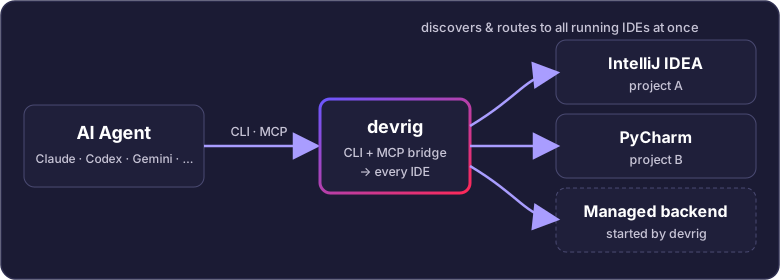
This is what I call Level 3 of MCP Steroid: the agent is no longer the customer of a manually configured environment. The environment configures itself for the agent.
The headline number: the e2e test in DevrigManagedBackendAgentE2ETest.kt provisions an IntelliJ
Community via devrig, opens Keycloak, and asks Claude to find PSI usages of
org.keycloak.models.UserModel over its ReferencesSearch. The verified count is 4,633, in
one prompt.
I want to show what it does, why it matters, where the trade-offs are, and — most importantly — ask what you would have it do next.
The three levels
I have been organizing the work in my head as three levels of autonomy. They line up roughly with Swarmia’s five levels of coding-agent autonomy, but applied to the agent ⇄ IDE boundary:
- Level 1 — Manual. The user starts the IDE, installs the plugin, copies the port into the agent’s MCP config. Every step is human. This is where most teams still live.
- Level 2 — Auto-discovery. The agent’s MCP client finds whichever IDE happens to be running, reads its open projects, routes calls correctly. The user still has to launch the IDE.
- Level 3 — Fully autonomous lifecycle.
devrig installwrites the agent’s MCP config.devrig backend download/startbrings the IDE into existence. Open project, route calls, stop cleanly. The human is out of the loop.
devrig is the first thing in the MCP Steroid family that delivers Level 3 end-to-end.
A quick map of where we were
The original MCP Steroid post argued that AI Agents need the full IntelliJ runtime, not a curated list of tool functions. The MCP standard defines two transports: stdio and Streamable HTTP. JetBrains’ own bundled MCP Server picks HTTP — it listens on a port and the agent dials in. Stdio still dominates IDE use cases though (~67 % of deployments in 2026 per a recent adoption survey), and for good reason: it maps 1:1 to “launch a subprocess; talk to it over pipes”. No ports, no DNS, no firewall, no “which IDE answered?”.
For one user, one machine, one IDE, the HTTP model is fine. For a real agentic-coding workstation it is a small disaster:
| Real-world setup | What breaks |
|---|---|
| IntelliJ + PyCharm + Rider open simultaneously | Each grabs a different port; agent picks one |
| Two windows of the same product | Same port, two projects, ambiguous routing |
| Project on a remote dev machine | Manual SSH tunnel, manual port-forward |
| First-time setup on a clean laptop | Install IDE → install plugin → restart → … |
| Background batch job needing an IDE | “Please leave the IDE open” — for hours |
This is the swamp devrig is built to drain. The product website calls it
“one bridge, every IDE” — one devrig mcp process connects your AI Agent to
all the IntelliJ-family IDEs running on your machine at once, across projects, and can
download and start more on demand.
What devrig actually is
Architecturally, devrig is the smallest possible thing the agent talks to: a Kotlin-based
command-line program that speaks MCP over stdio on its front and routes everything else to
whatever IntelliJ-family IDE makes sense. The same binary doubles as an admin CLI you can run
by hand.
One scope note, because it is a common question: today devrig is a suite that bridges the agent
to IDEs running the MCP Steroid plugin — that is what gives the agent the full IntelliJ
runtime. It is not a front-end for the IntelliJ-native MCP Server (JetBrains’ own bundled
one). devrig already detects those IDEs so it can offer to fix them, but it does not route the
agent through them yet. Speaking to the IntelliJ-native MCP Server directly — so an agent reaches a
stock IDE with no plugin installed — is planned for a future release.
The current subcommand surface, straight from devrig --help:
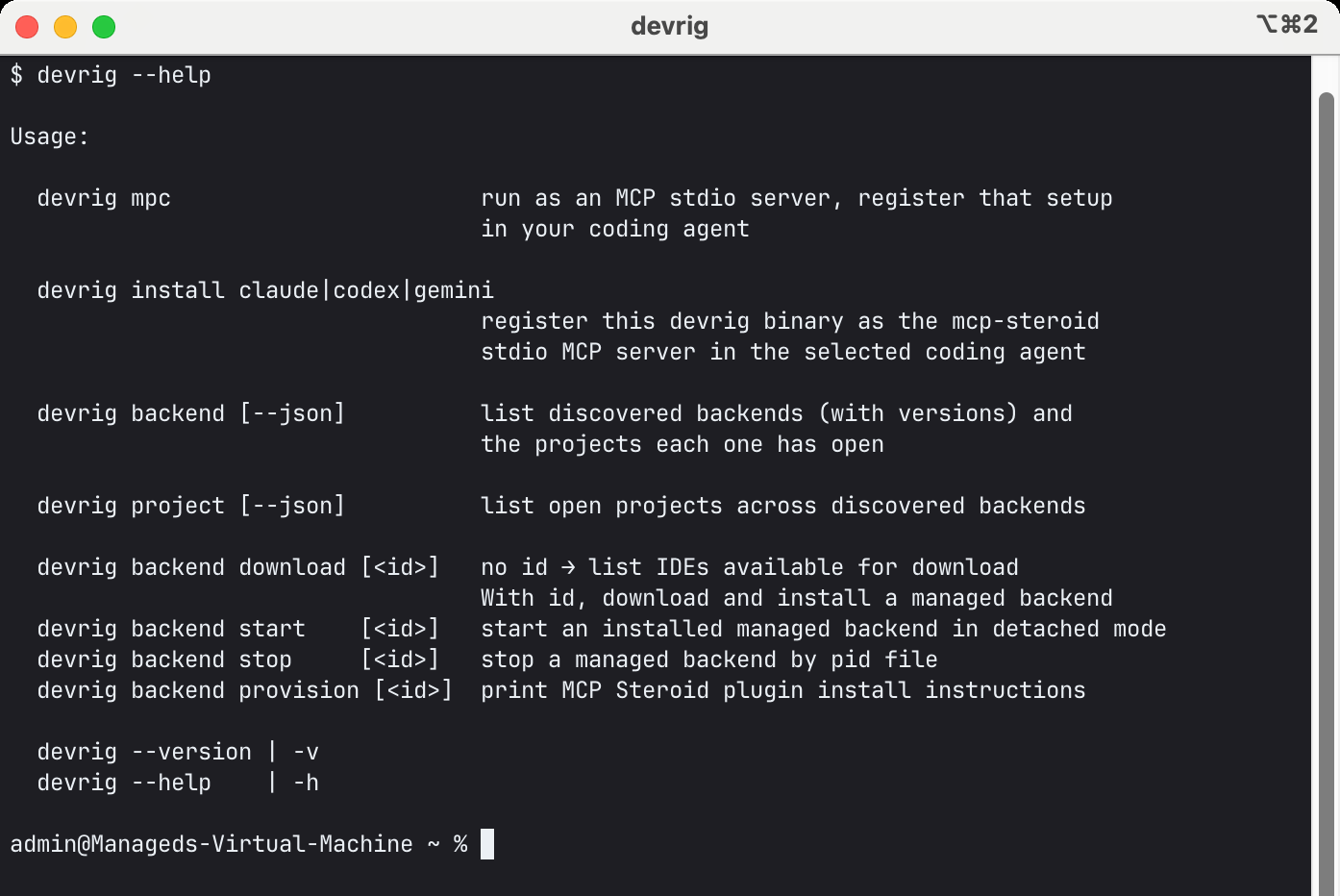
The agent only ever sees devrig mcp. Everything else is for humans or CLI integrations, or for swarm scripts
(run-agent.sh and friends) orchestrating fleets. devrig ships without a bundled
runtime and is compiled for Java 25: provide a JDK 25 on PATH, via DEVRIG_JAVA_HOME.
Amazon Corretto 25 works; so does any other JDK 25.
We are going to automatically fetch the required runtime JDK in the next versions.
devrig install — the new entry point
For most users, the very first command they run is the one that wires devrig into their coding
agent. It landed in 0.100 to close issue #64:
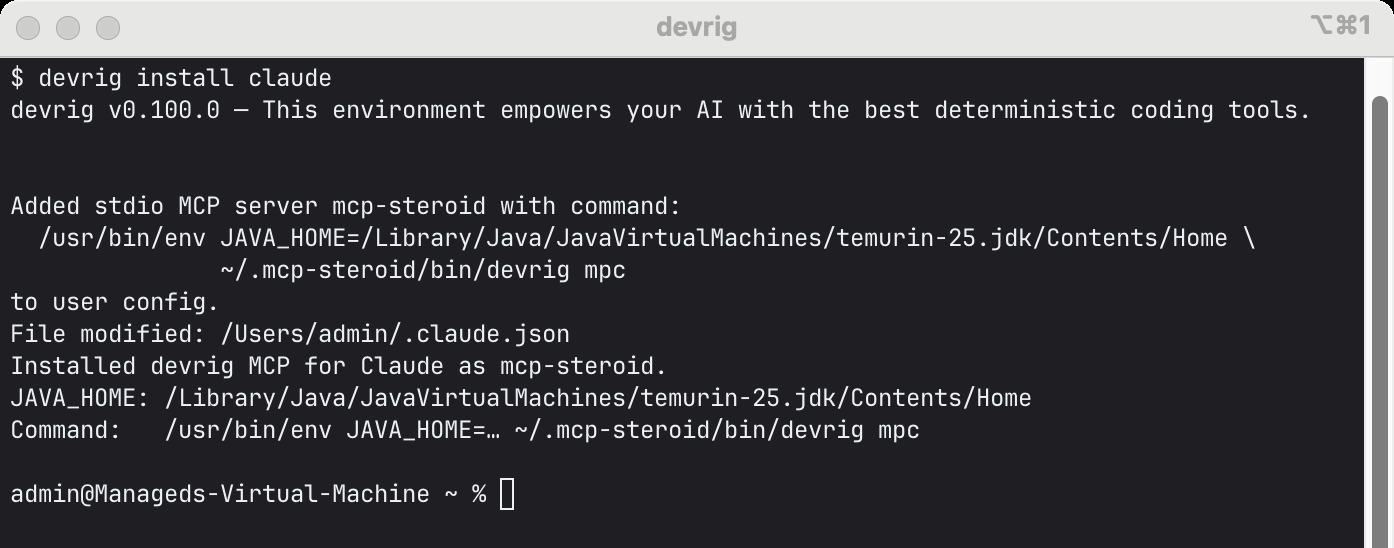
Three flavors, all delegating to the agent’s own CLI under the hood so the resulting config is exactly the one the agent itself expects:
devrig install claude→claude mcp add --scope user mcp-steroid -- devrig mcpdevrig install codex→codex mcp add mcp-steroid -- devrig mcpdevrig install gemini→gemini mcp add --type stdio --scope user --trust mcp-steroid devrig mcp
These three syntaxes were the single biggest source of setup failures while scripting the demo.
Three CLIs, two of which have the -- argv-forwarding gotcha,
one with a different flag spelling each release. The bug-of-the-week was forgetting the mcp
subcommand and registering devrig with nothing after it — at which point the agent tried to run
plain devrig, got the help banner on stdout, and reported “MCP server initialize failed” with no
explanation. The devrig install subcommand makes that class of failure unrepresentable. (The
subcommand was originally spelled mpc; mcp is now the canonical name and mpc stays as a hidden
alias so older registrations keep working.) Re-running devrig install is a safe, idempotent upsert:
it finds every prior devrig/mcp-steroid entry and consolidates them into one.
It also records JAVA_HOME explicitly so the registered MCP command is reproducible — the JDK
the user actually has on their host is the one the agent will use, not whatever the user’s shell
JAVA_HOME resolves to next month.
Discovery, the unglamorous backbone
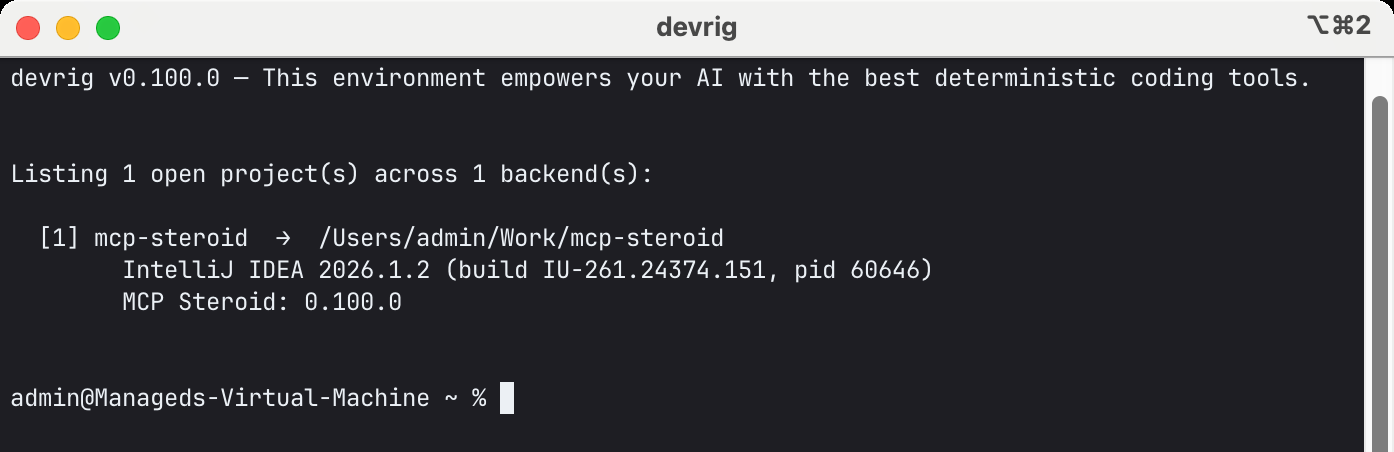
Pop a few JetBrains IDEs open and run devrig backend. On my workstation right now, with one real
IntelliJ open and one previously-downloaded managed Community sitting on disk:
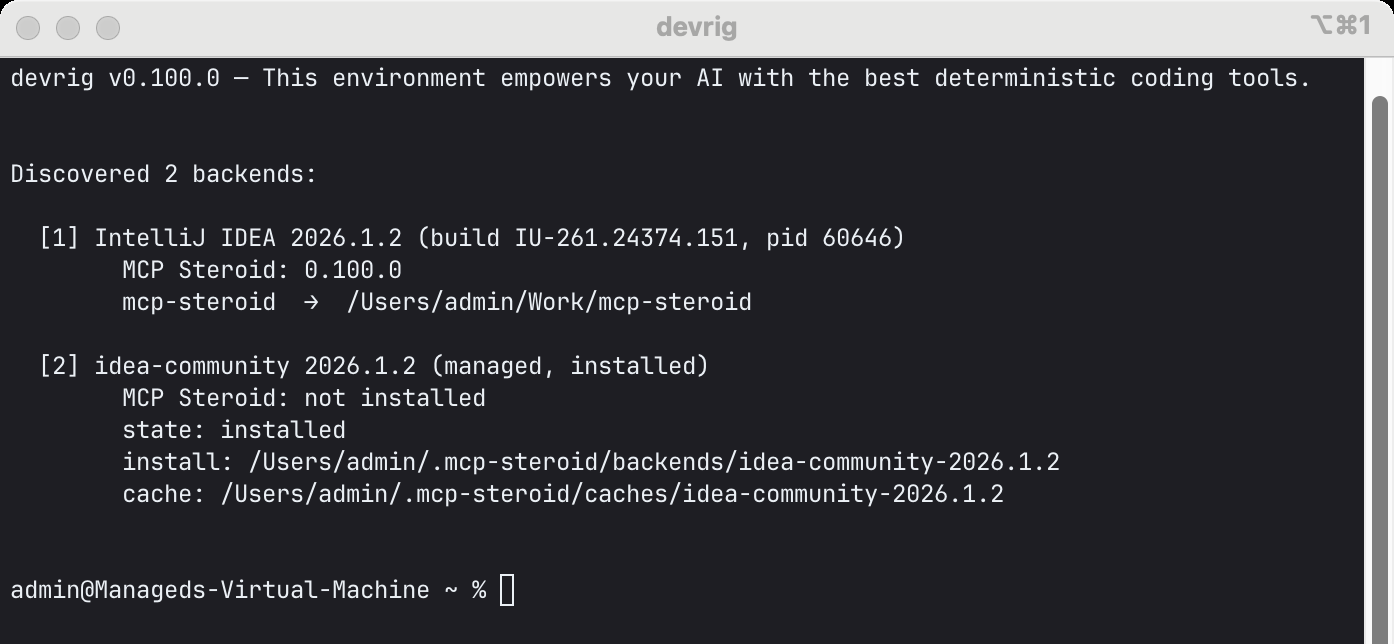
Two paths feed that list:
- Marker files — every IDE with MCP Steroid installed writes a schema-versioned JSON file at
~/.mcp-steroid/markers/<pid>.mcp-steroidcarrying its pid, MCP URL, IDE identity, plugin version, bearer token, and a per-JVMbootHash.devrigreads them and subscribes to each IDE’s NDJSON projects-stream endpoint for a live snapshot of open projects. - Active port scan of
127.0.0.1:63342..63361(the IntelliJ built-in Netty server, which picks the first free port from 63342) and:64342..64361(JetBrains’ own bundled MCP server). This catches IDEs running without MCP Steroid so we can offer to fix them.
devrig backend lists managed backends too — IDEs devrig itself downloaded under
~/.mcp-steroid/backends/ — even when they are not currently running. That’s the second row in
the screenshot. Discovery, install state, and lifecycle state share one consolidated view, and
every row carries the plugin version so an out-of-date MCP Steroid is visible at a glance.
Names are not the same string the IDE uses internally. The devrig naming spec
defines an exposed form: slug(originalName)-projectHash, where projectHash is a
SHA-256-derived base62 string (8 chars) over canonical inputs. Base62 was a deliberate switch
from base64url — the earlier scheme produced exposed names like mcp-steroid-gumou--- whenever
the encoder spilled trailing - / _ characters. Identifier-safe alphabet, always 8 chars,
stable across IDE restarts.
Routing across many IDEs, many projects
When two IDEs both have a project called myapp open, what does the agent see? Names alone are
ambiguous, and the agent will not be impressed by “tried to open myapp, got the wrong one”.
Same scheme as above — <slug>-<projectHash> — applied per project per IDE pid. Two myapps
become two distinct exposed names. Windows route the same way (used by screenshots and
window-targeted actions).
There is one subtlety worth knowing, and it is where the first follow-up to 0.100 landed. In 0.100, when
the agent called steroid_open_project, devrig guessed the target IDE — any running managed
backend first (the agent’s own sandbox), the newest discovered IDE otherwise. That guess is fine
until two IDEs could each plausibly answer. So issue #87 made the choice explicit:
steroid_list_projects now self-describes a backends[] list, each entry carrying an opaque,
routable backend_name, and steroid_open_project now requires that backend_name on the
devrig surface to say exactly which IDE opens the project. It is a devrig-only parameter — a
direct one-IDE connection does not expose it, and ignores it if sent — and an unknown value comes
back as a self-correcting error listing the routable ones. The guidance
the agent gets: prefer the backend that already has the same repository — or a sibling git worktree
of it — open. One catch worth repeating in the prompt: those ids are not stable across IDE
restarts, so the rule is re-read steroid_list_projects, don’t cache backend_name.
Auto-downloading and auto-starting a managed IDE
The biggest jump from Level 2 to Level 3. devrig backend download (no id) lists what is
available, and declares which IDEs are compatible with the plugin version that ships in this
build of devrig:
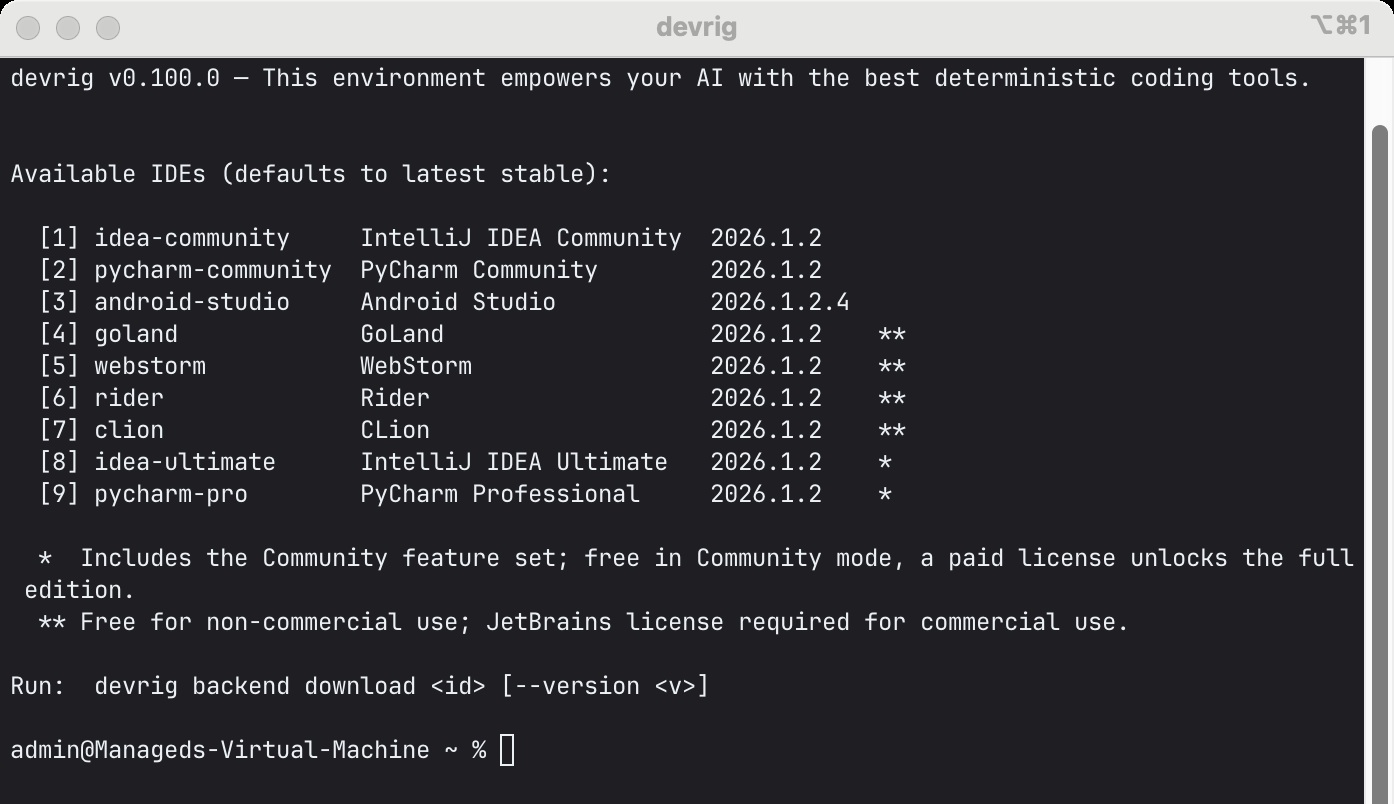
A few interesting things here:
- Community editions come from the real GitHub releases of
idea-community/pycharm-community, not from the marketing-version JetBrains feed — the JetBrains products API doesn’t surface true IC/PC release artifacts in a stable enough way.devrigresolves them directly from the open-source repos. - Android Studio comes from the Quail canary feed — there is no
data.services.jetbrains.comrow for it, but Quail publishes a canonical SHA-256 per archive. - Plugin compatibility is gated at download time. Every row carries the IDE’s build baseline
(e.g.
261). The bundled MCP Steroid plugin’ssince-build/until-buildfromplugin.xmlis read at startup, and IDEs whose baseline falls outside the supported range are marked incompatible —devrig backend downloadrefuses to fetch them rather than letting the agent land in an IDE that silently won’t load the plugin. Primary baseline today: 2026.1 (261), with 2026.2 EAP (262) as secondary verification. 2025.3 (253) is dropped. - Archive caching is hash-qualified. Community and Ultimate archives that happen to share a filename cannot collide; both unpacked trees carry a SHA-derived prefix.
$ devrig backend download idea-ultimate
… resolving IDE 2026.1.2 from data.services.jetbrains.com …
… downloading idea-ultimate-2026.1.2 (≈ 1.2 GB) …
id:       idea-ultimate-2026.1.2
state:    installed
install:  /Users/jonnyzzz/.mcp-steroid/backends/idea-ultimate-2026.1.2
cache:    /Users/jonnyzzz/.mcp-steroid/caches/idea-ultimate-2026.1.2

$ devrig backend start idea-ultimate
pid:    67890
log:    /Users/jonnyzzz/.mcp-steroid/caches/idea-ultimate-2026.1.2/logs/managed.log
config: /Users/jonnyzzz/.mcp-steroid/caches/idea-ultimate-2026.1.2/config
The started IDE is headless from the user’s perspective — it can stay in the background as
long as the agent needs it, and devrig backend stop reaps it cleanly. A global lock serialises
download / start / stop so two concurrent agents can’t trash the same on-disk install. Managed
backends emit anonymous PostHog beacons (devrig_session_initialized, devrig_exec_code,
start / stop, errors) so I can tell whether agents are actually using the lifecycle or working
around it.
The whole flow, end to end
The sequence above is exactly what the end-to-end test does, and it is the cleanest demonstration of
Level 3 I have. In one prompt, with no MCP config and no IDE running up front: devrig install claude, then
devrig backend download idea-community, devrig backend start idea-community, and then Claude
opens Keycloak and runs
JavaPsiFacade.findClass("org.keycloak.models.UserModel") → ReferencesSearch.search(psiClass).findAll().size.
The return value is real:
4,633 PSI usages of
org.keycloak.models.UserModel— in one prompt.
It comes straight from the e2e test (DevrigManagedBackendAgentE2ETest.kt). One honesty note: the IDE
archive and Keycloak’s Maven indices are pre-warmed before the run, so the wall-clock stays short —
but that only changes the timing. The agent’s actual work — provision the IDE, open the project,
run the PSI search — is byte-identical whether the caches are warm or cold.
What 0.100 changed beyond devrig
The 0.100 release notes (GitHub release v0.100) cover the full
delta, but the agent-facing items worth naming alongside devrig:
- Typed
modalmode forsteroid_execute_code. The earlier mix of dialog-killer and allow-modal booleans is replaced with one explicit parameter:smart_non_modal(default — close stray dialogs, verify non-modal, commit + refresh, wait for smart mode),non_modal(assert only, no mid-run policy), orunleashed(intentional modal-dialog workflows). - The tool surface narrowed from 10 → 8.
steroid_action_discoveryandsteroid_apply_patchare gone; the same workflows live as recipes (mcp-steroid://ide/action-discovery,mcp-steroid://ide/apply-patchwith the in-scriptapplyPatch { }DSL) reached only throughsteroid_fetch_resource. The IDE-conditional context the resource carries is the reason for not advertising recipes via the generic MCPresources/list. steroid_inputswitched towindow_id(fromsteroid_list_windows/steroid_take_screenshot). Breaking change to that tool’s input — worth flagging if you have scripts pinning the oldscreenshot_execution_id.- The devrig↔plugin wire contract is pinned, additive-only, with contract tests covering the
full
steroid_execute_codeparameter set (issue #23). - Token-efficient tabular output.
printCsv/printToonscript-context helpers letsteroid_execute_codereturn compact tables without token bloat (#34 / #35). - Human review mode is gone in full — the
review.*registry keys, themcp.steroid.review.modesystem property, the storage helpers, the docs and website pages. The product is focused on agent-driven IDE execution rather than a human-gated review step.
Pros — what changes for the agent
- One transport, one server.
devrig mcpis the only thing the agent’s MCP config has to know. No ports, no URLs, no per-machine drift. Stdio is the dominant IDE transport for a reason. - The install is a single command.
devrig install claude|codex|geminiwrites the agent config the way the agent itself expects. The three-CLI argv-forwarding tax is paid once, indevrig, not on every user’s machine. - Multi-IDE, multi-window, multi-project — out of the box. Hash-suffixed routing makes “which one?” disambiguation explicit; base62 hashes are identifier-safe.
- Compatibility gating. If the bundled plugin can’t load in a given IDE build, that IDE is flagged at download time. Fewer silent dead-ends.
- First run is one command, not a setup checklist. No “go install the IDE first” step in the
agent’s bring-up guide —
devrig backend downloadis the install step (a real download the first time, cached after). - Background mode is normal. Spinning up an IDE for a 4-hour batch job stops being weird; it
is just
start+stop. The Docker test matrix exercises that path daily. - Inspectable.
devrig backend --jsonanddevrig project --jsongive swarm scripts a deterministic snapshot to make decisions on. Managed backends report their lifecycle via PostHog beacons.
Cons — and I want you to read these honestly
- JDK 25 is a hard requirement.
devrigdoesn’t bundle a JVM in 0.100; the host must provide Java 25. A bundled-runtime story is on the roadmap (the deployment spec exists), not in the box yet. - Port-range assumption. The active scanner pings exactly
63342..63361and64342..64361. Anything outside those ranges is invisible. Right default in 2026; still a default. - Managed-IDE operations are one-at-a-time. A global lock prevents concurrent download / start / stop. Two agents on the same machine launching different IDEs in parallel will serialise. Probably the right call; worth knowing.
- Detection lag. A crashed IDE stays in the routing table for ~2 seconds until the next poll.
- The trust dialog can still block a fully-autonomous open. On 2026.1.2 the project-trust auto-grant regressed (issue #65): a freshly opened project can stall on the Trust dialog — the one human gate that quietly defeats the “human out of the loop” pitch until someone clicks it. Embarrassing for a Level 3 story, and it belongs near the top of the fix list.
- Multi-IDE labeling is still settling. With several IDEs open,
steroid_list_projects/steroid_list_windowscould mislabel which backend a project belongs to (issue #89). The explicitbackend_namemodel above points the right way, but making the labels themselves reliable across many IDEs is the actual fix, and that part is still in flight. - Plugin install on user-launched IDEs still has a human seam.
devrig backend provisionprints instructions — it does not yet drop the plugin file into the user’s main IDE config automatically. Closing that seam is on the list. - Single-user assumption.
~/.mcp-steroid/is per user. Multi-tenant CI servers will need a story; today they get one home directory. - macOS / Linux first. Windows is supported (the
devrig installPowerShell path is real), but most production hours so far live on macOS arm64. - 2025.3 is dropped. If you are on
253, the plugin will refuse to load anddevrigwill refuse to download the matching managed backend. Upgrade to 2026.1.
Open questions — what should it do next?
This is the part I really wrote this post for. 0.100 is shipped, a fast follow-up added explicit
backend_name routing, and the foundation works. Now I want to choose what to build next based on
what you actually need.
A few directions on the whiteboard — please tell me which ones matter, and what I am missing:
- Remote IDEs as a first-class concept.
devrigalready routes between local IDEs. Same abstraction wants to extend to a JetBrains Gateway / SSH host: telldevrig“use the IDE ondev-box-7” and it sets up the channel. Niche, or the next obvious step? - Fully autonomous plugin install into a user-launched IDE. Drop the plugin file in the right directory, restart the IDE, verify the marker appeared, report back. Worth it, or do most users want a manual confirmation step?
- Bundled-JRE devrig. Ship a
~/.mcp-steroid/binaries/<os>-<cpu>-<sha>/cache with a small wrapper, so the JDK-25 prerequisite stops being a prerequisite. The deployment spec is written. - Fleet mode. One
devrigserver, N parallel agents, one user — each agent gets its own managed IDE window without trampling the others. The lock today serialises; fleet mode would need a different concurrency story. devrig doctor. Self-diagnostic command: “your plugin is out of date in IDE 2, port 63344 is taken by a different process, your JDK is missing on Linux/arm64, yourclaudeMCP entry points at a stale path.”- Sandboxed IDE profiles. Spawn an IDE with a throwaway config dir for one task, then delete. Reproducible runs without polluting the user’s main IDE setup.
- CI-friendly mode. Headless start optimised for GitHub Actions / TeamCity where the “human in the loop” assumption no longer holds.
- Plugin auto-update. When
devrigitself updates and ships a newer plugin, push it into every managed IDE on the machine. - Auth and policy. The per-IDE bearer token is already on the marker file. The next question is who is allowed to do what — does that matter to teams, or is it overkill outside enterprise?
- More agent CLIs. Cursor, Aider, Continue, IntelliJ AI Assistant chat —
devrig installtoday knows three. Adding a fourth ismcpAddStdioArgsplus an enum entry. Which one would actually unblock you?
Reply on LinkedIn, Twitter, or open an issue on jonnyzzz/mcp-steroid — and the more concrete the workflow you describe, the more directly I can shape this around it. Issue #64 tracked the auto-install ask before it landed; the same template works for anything on the list above.
Where this is going, and where it is
I have been writing about Agentic Experience and Tools as the discipline of building products with the AI Agent as the user, not as a feature bolted onto a human-facing UI. MCP Steroid is that bet, and it has a deliberate arc:
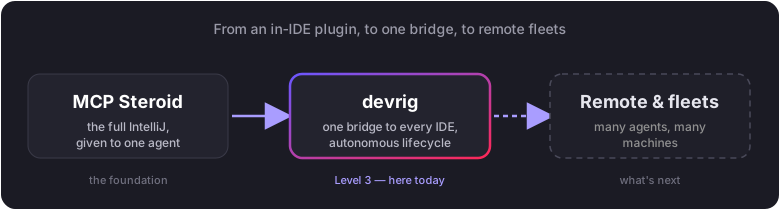
The plugin came first: hand the agent the full IntelliJ runtime instead of a curated tool menu.
devrig is the next move — wrap that capability in one stdio bridge so the agent reaches every
MCP Steroid–enabled IDE on the machine, and can bring a managed one into existence on its own. The
step after that is remote: the same protocol pointed at IDEs on other hosts, and eventually fleets
of them, which is probably where the commercial product starts to make sense.
So where are we, honestly? Level 3 has worked end to end — the Keycloak run is not a mock,
and the backend_name routing that landed right after 0.100 makes “which IDE?” an explicit,
answerable question. The foundation is real. It is also still an independent experiment with sharp
edges: the 2026.1.2 trust-dialog regression can still stall an autonomous open, the JDK-25
prerequisite is unbundled, plugin promotion into a user’s own IDE still has a manual step, and
~/.mcp-steroid/ assumes a single user. Remote and fleet mode are designed, not shipped.
The honest summary: the agent can now stop asking a human for help just to get started against a real IDE — and that, I think, is where this kind of tooling gets interesting. What it should reach for next I genuinely do not know yet; that is what the open questions above are for. Tell me which one is yours.